---
title: How to Generate an API Key for Lara Translate
description: Learn how to generate an API key for Lara Translate in a few easy steps. Securely create, store, and manage your credentials for seamless integration
---
[Skip to content](https://support.laratranslate.com/en/api-key-for-laras-api#main-content)
- [English](https://support.laratranslate.com/en/api-key-for-laras-api)
- [Deutsch](https://support.laratranslate.com/de/api-schlüssel-für-laras-api)
- [Italiano](https://support.laratranslate.com/it/chiave-api-per-le-api-di-lara)
English
Show submenu for translations
[](https://support.laratranslate.com/en/?hsLang=en)
Open main navigation
Close main navigation
- - [English](https://support.laratranslate.com/en/api-key-for-laras-api)
- [Deutsch](https://support.laratranslate.com/de/api-schlüssel-für-laras-api)
- [Italiano](https://support.laratranslate.com/it/chiave-api-per-le-api-di-lara)
English
Show submenu for translations
- [Submit a request](https://2er2r1.share-eu1.hsforms.com/2CJaQX4efSGa8WhPQM8ImGg)
[Submit a request](https://2er2r1.share-eu1.hsforms.com/2CJaQX4efSGa8WhPQM8ImGg)
How can we help you?
- There are no suggestions because the search field is empty.
1. [Lara Translate Knowledge Base](https://support.laratranslate.com/en?hsLang=en)
2. [API and Integrations](https://support.laratranslate.com/en/api-and-integrations?hsLang=en)
3. [API](https://support.laratranslate.com/en/api-and-integrations?hsLang=en#api)
July 2, 2026
# How to Generate an API Key for Lara Translate
## Step-by-step guide to generating an API Key
Once you have your key, head to the [Developer Hub quickstart](https://developers.laratranslate.com/docs/getting-started) to install an SDK or MCP and make your first request.
Generating an API key for **Lara Translate** is quick and easy. Follow these steps to create your API key and integrate translation services into your applications.
Step by step guide
**Step 1: Sign Up or Log In**
If you don’t have an account yet, sign up at [Lara Translate](https://laratranslate.com/translate).
If you already have an account, log in to access your dashboard.
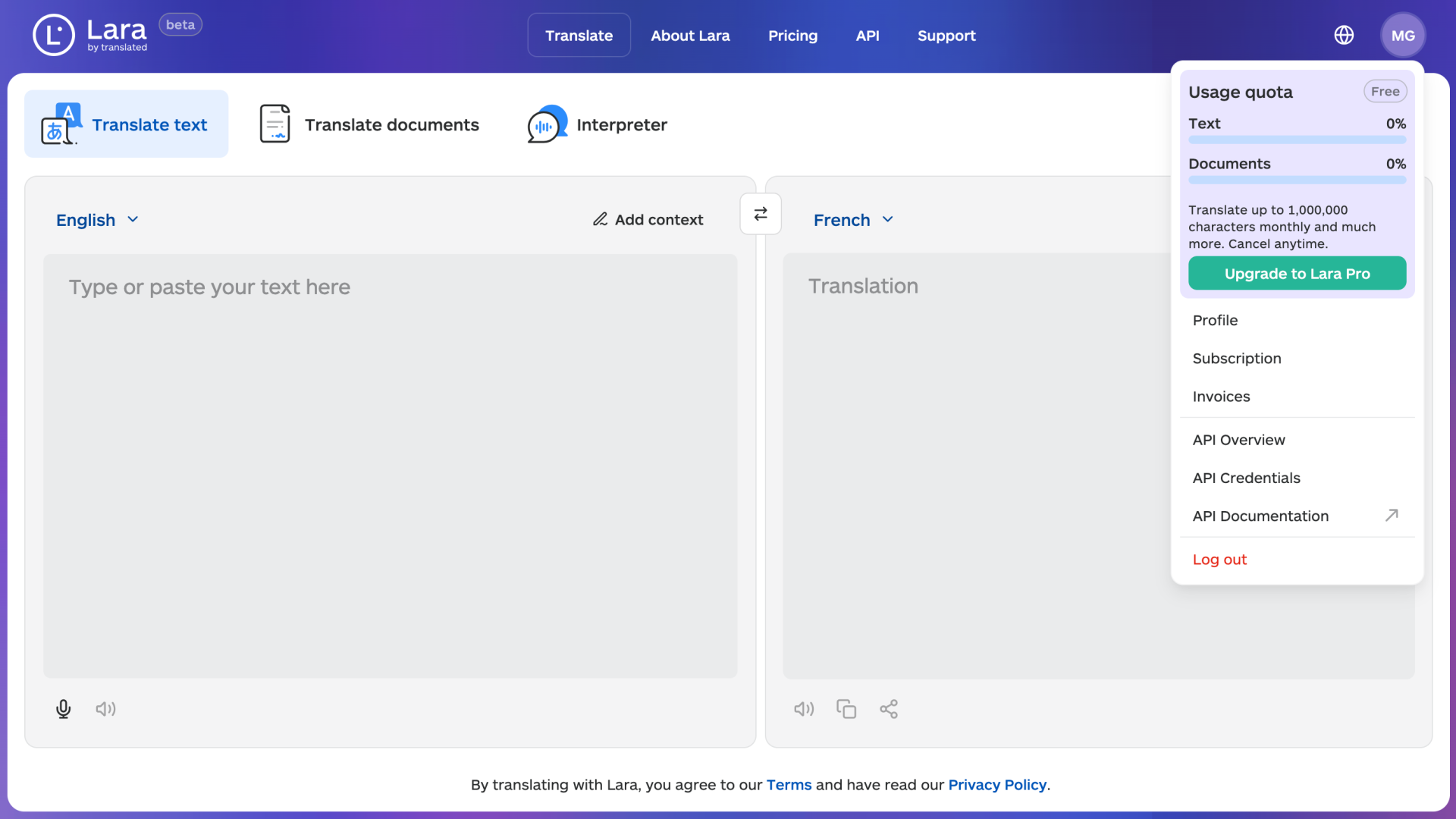
**Step 2: Navigate to API Credentials**
Once logged in, go to the menu and select **API credentials** to manage your API access.
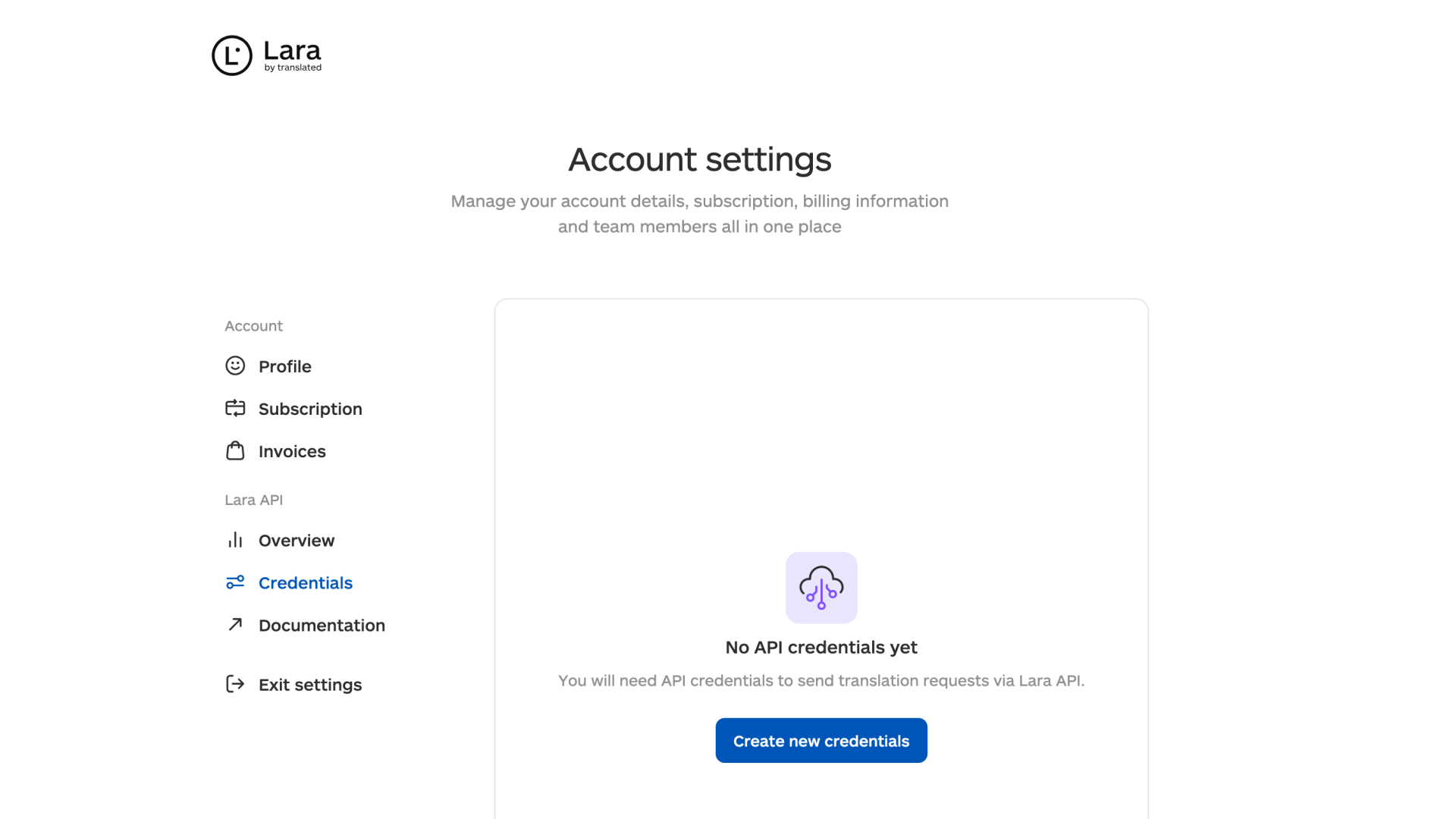
**Step 3: Create New Credentials**
Click on **create new credentials** to generate a new API key.
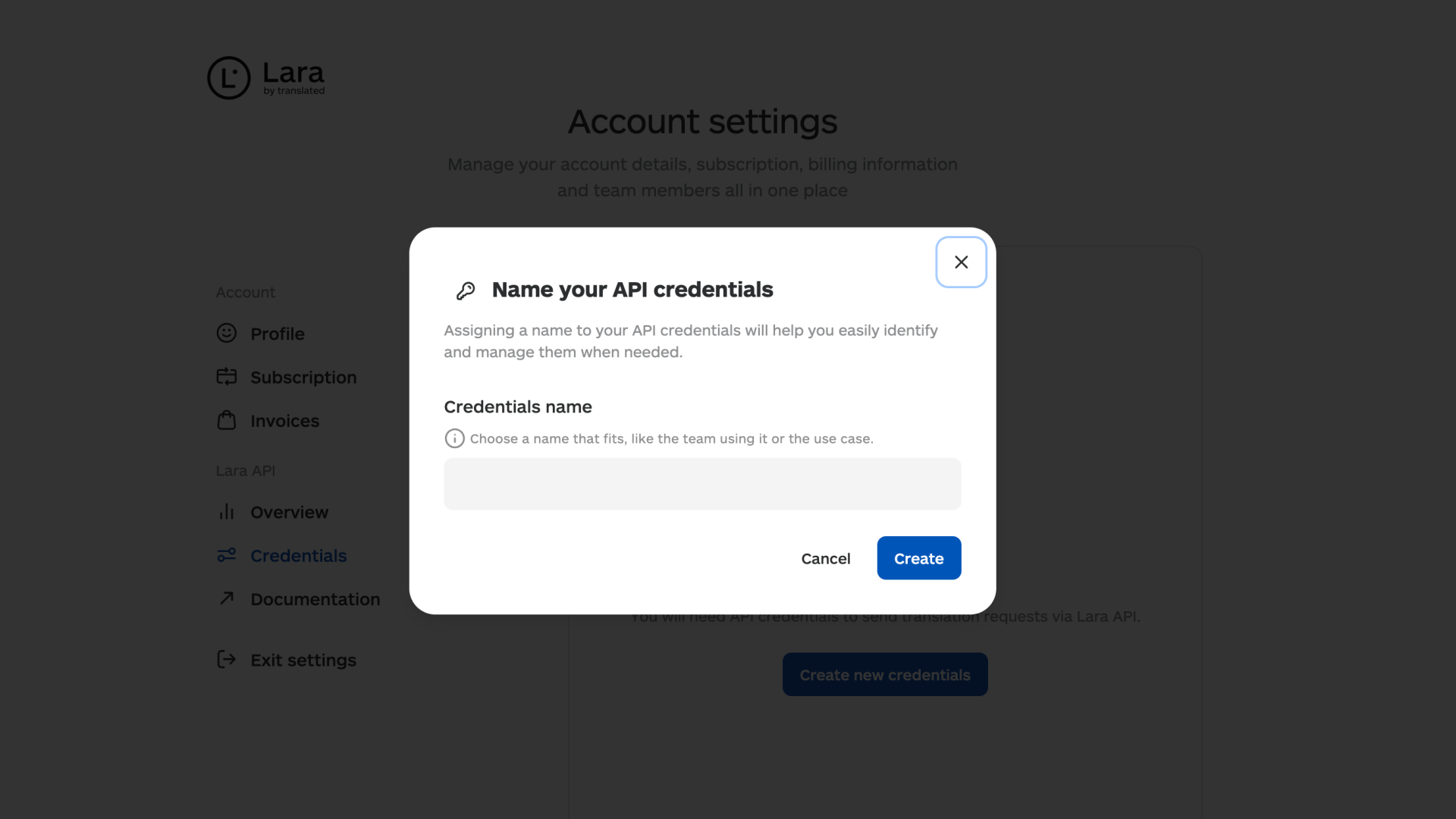
**Step 4: Name Your API Key**
Enter a **name** for your **API key** to help you identify it later, **then** click **Create**.
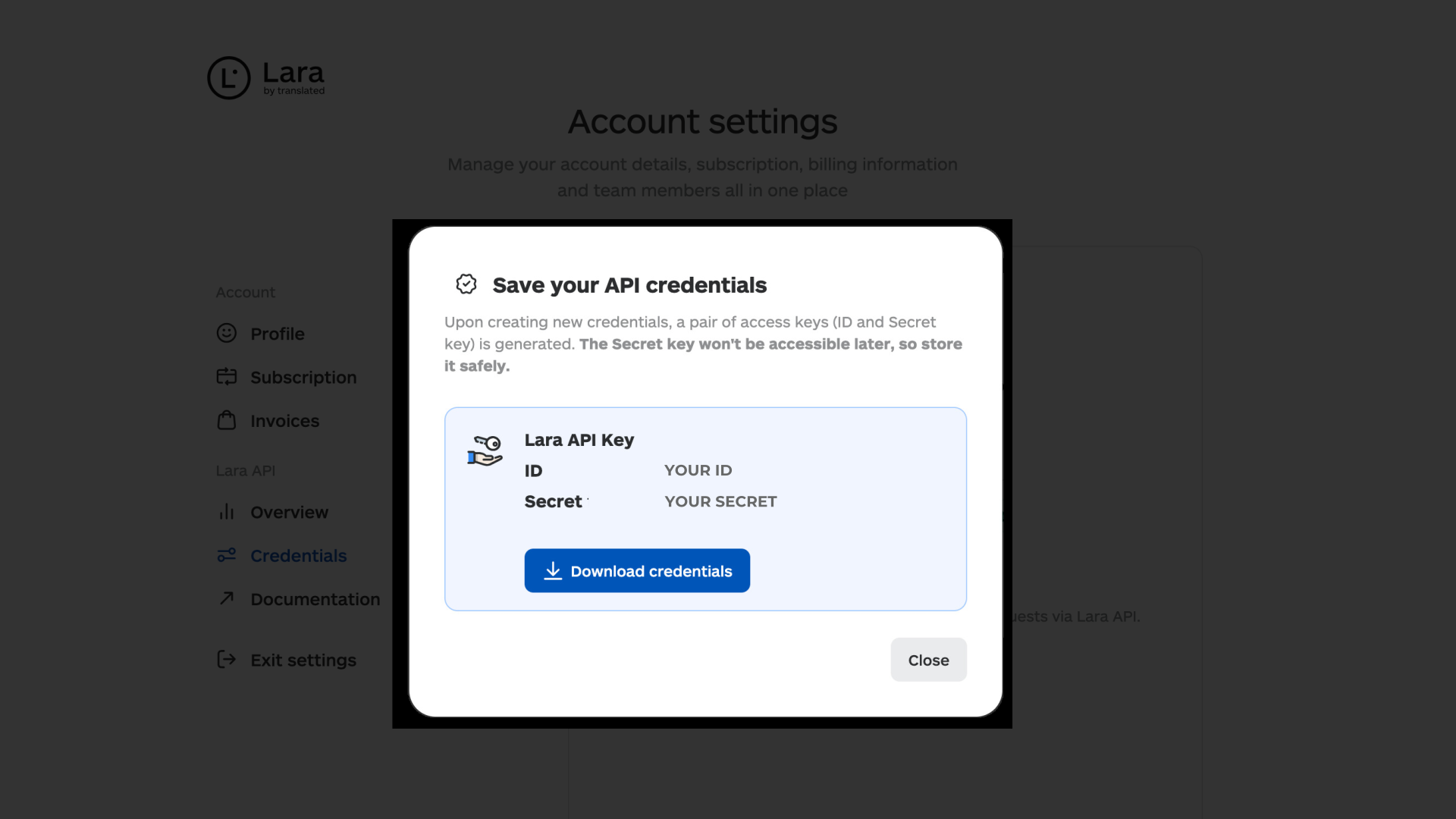
**Step 5: Save Your Credentials**
When your key is generated, make sure to click **on Download Credentials** right away and save the file in a secure location. This is really important: for **security reasons**, you won’t be able to view or retrieve the key again after you leave the page. **If you lose it, you’ll need to create a new one.**
Now that you have your API key, you can start making API requests.
**Free Plan Limitations**
If you are on the **free plan**, you can create **only one API key**.
If you need additional keys, consider [upgrading plan](https://developers.laratranslate.com/docs/pricing-page) or contact our [sales team](https://laratranslate.com/adaptive-translation-api) for a custom quote.
---
### This article is about
- Steps to generate an API key in Lara translate
- API key limits on the free plan
- How to obtain additional API Keys
Visit our Translation API documentation for full details
[Check out the full documentation here](https://developers.laratranslate.com/)
- [About Lara](https://support.laratranslate.com/en/about-lara?hsLang=en)
- [How to use Lara](https://support.laratranslate.com/en/how-to-use-lara?hsLang=en#main-content)
- [Translate text](https://support.laratranslate.com/en/how-to-use-lara?hsLang=en#translate-text)
- [Translate documents](https://support.laratranslate.com/en/how-to-use-lara?hsLang=en#translate-documents)
- [Translate voice](https://support.laratranslate.com/en/how-to-use-lara?hsLang=en#translate-voice)
- [Translate images](https://support.laratranslate.com/en/how-to-use-lara?hsLang=en#translate-images)
- [Translate audio](https://support.laratranslate.com/en/how-to-use-lara?hsLang=en#translate-audio)
- [Account and Subscriptions](https://support.laratranslate.com/en/account-and-subscriptions?hsLang=en#main-content)
- [Manage your account](https://support.laratranslate.com/en/account-and-subscriptions?hsLang=en#manage-your-account)
- [Payments and Invoices](https://support.laratranslate.com/en/account-and-subscriptions?hsLang=en#payments-and-invoices)
- [Manage your subscription](https://support.laratranslate.com/en/account-and-subscriptions?hsLang=en#manage-your-subscription)
- [Manage Team](https://support.laratranslate.com/en/account-and-subscriptions?hsLang=en#manage-team)
- [Pricing](https://support.laratranslate.com/en/account-and-subscriptions?hsLang=en#pricing)
- [API and Integrations](https://support.laratranslate.com/en/api-and-integrations?hsLang=en#main-content)
- [API](https://support.laratranslate.com/en/api-and-integrations?hsLang=en#api)
- [CAT tools](https://support.laratranslate.com/en/api-and-integrations?hsLang=en#cat-tools)
- [MCP Server](https://support.laratranslate.com/en/api-and-integrations?hsLang=en#mcp-server)
- [Integrations](https://support.laratranslate.com/en/api-and-integrations?hsLang=en#integrations)
- [Data Security and Privacy](https://support.laratranslate.com/en/data-security-and-privacy?hsLang=en#main-content)
- [Data security](https://support.laratranslate.com/en/data-security-and-privacy?hsLang=en#data-security)
- [Privacy](https://support.laratranslate.com/en/data-security-and-privacy?hsLang=en#privacy)
- [Frequently Asked Questions](https://support.laratranslate.com/en/frequently-asked-questions?hsLang=en#main-content)
- [Glossary](https://support.laratranslate.com/en/frequently-asked-questions?hsLang=en#glossary)
- [Useful Tips](https://support.laratranslate.com/en/frequently-asked-questions?hsLang=en#useful-tips)
[](https://laratranslate.com)
© Translated · VAT IT07173521001
Copyright © 2025