
Lara allows you to quickly understand the meaning of a word directly inside the text editor, based on the specific context in which it appears.
This helps you clarify ambiguous or unfamiliar terms without leaving the interface or interrupting your translation workflow.
What the Explain feature does
Explain provides a short explanation of a selected word or expression by taking into account the surrounding context.
Instead of offering a generic dictionary definition, Lara explains how that word is used in that specific sentence, helping you understand intent and nuance before translating.
Explanations are concise and focused, designed to support understanding rather than replace interpretation.
How to use Explain
To explain a word in context:
-
Select a word or a short expression in the source text editor
-
Choose Explain
-
Lara shows a brief explanation based on the surrounding text
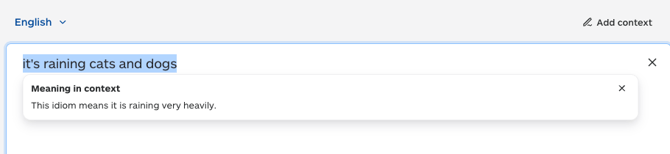
You can select up to 10 words at a time. The feature is intended to explain individual terms or short expressions, not entire sentences or paragraphs.
Explanations are shown in the same language as the source text.
This ensures that meaning is clarified without translating or rewriting the content, and helps you reason about the original text before deciding how to translate it.
Explain uses the selected sentence and nearby context to:
-
disambiguate meaning
-
choose the most likely interpretation
-
briefly note ambiguity when relevant
The source text is not rewritten or quoted, and explanations remain short and paraphrased.
When to use Explain
Explain is useful when:
-
a word has multiple possible meanings
-
the intent of a term is unclear
-
nuance matters before translating
-
you want to confirm your understanding of the source text
This article is about:
-
understanding the meaning of words in the source text
-
clarifying ambiguity based on context
-
using the Explain feature inside the text editor
-
knowing what Explain does — and what it does not do