
Lara Translate is an AI-powered translation app developed by Translated, designed to deliver high-quality translations for text, documents, and live conversations on Android devices.
Lara Translate is available on the Google Play Store.
Home screen and translation modes
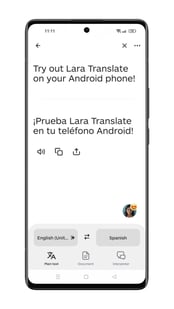 From the home screen, you can choose between three translation modes:
-
Plain text – translate typed or pasted text
-
Document – upload and translate files
-
Interpreter – speak and get real-time interpretation
You can also swap languages or let Lara automatically detect the source language.
Text translation
-
Enter or paste the text you want to translate
-
Lara generates the translation instantly
-
From the result screen, you can:
-
Listen to the translation
-
Copy the translated text
-
Share it
-
-
- View alternative translations by tapping ALT
Alternative translations
When viewing a translation result, you can explore alternative renderings for specific words or phrases by tapping the ALT button below the translated text.
Tapping ALT highlights a word in the translation. A panel opens at the bottom of the screen showing alternative translation options, each with a short explanation of the context or register in which it would be used.
This feature is useful when you want to compare phrasing options or choose a more appropriate word for your specific context.
Right-to-left language support
Lara automatically displays translated text in the correct reading direction. When translating into right-to-left languages such as Arabic, Hebrew, or Persian, the translation output is aligned and rendered right-to-left without any additional setup.
Translation quality feedback
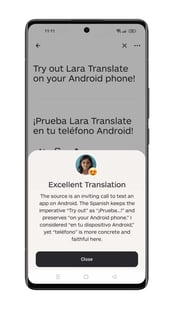
After a translation, Lara may show feedback explaining translation choices and quality.
This helps you understand how the translation was produced and why certain wording was used.
Translation styles
To access the feature, click the three-dots menu (⋮) above the source text. You can control how translations are generated using Styles:
-
Faithful – closer to the original wording and structure
-
Fluid – more natural and idiomatic
-
Creative – more expressive and adaptive
Adding context to improve translations
To access the feature, click the three-dots menu (⋮) above the source text. Adding context helps Lara clarify ambiguities and improve translation accuracy.
-
Open the three dots (⋯) menu
-
Tap Add context
-
Enter additional information (tone, audience, domain, etc.)
-
Apply it to update the translation
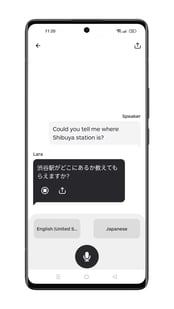 Interpreter mode enables real-time spoken translation.
-
Select Interpreter from the home screen
-
Choose the two languages
-
Press and hold the microphone button
-
Start speaking — Lara interprets for you
Ideal for conversations, travel, and meetings.
Document translation
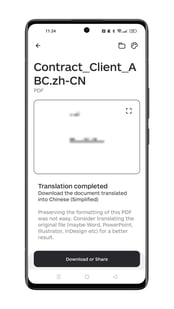
To translate a document:
-
Select Document
-
Upload a supported file — including PDF, Word, PowerPoint, Excel, and image files (PNG, JPG, and other supported formats). Images appear alongside other file types in the file picker.
-
Choose the target language
-
Start the translation
Once completed, you can download or share the translated document.
Tip
For best formatting results, consider translating the original editable file (Word, PowerPoint, InDesign, etc.).
Pay-on-demand features (API, Google Sheets, etc.) and payment methods
If you’re using Lara Translate on Android with an In-App Purchase subscription, pay-on-demand features such as the API or Google Sheets integration require an additional setup.
Please note: Users subscribed through Google Play (In-App Purchase) cannot be added to a Team plan as team members. To access a Team plan, cancel your Google Play subscription and subscribe directly at laratranslate.com.
Your subscription fee will continue to be billed through Google Pay. However, pay-on-demand usage is charged separately and requires you to add a payment method directly in your Lara account.
To enable API usage:
-
Go to My Account → API → Credentials
-
Add a payment method
-
Fill in your Billing Information
-
Once this is done, pay-on-demand consumables will be available and billed on the payment method you added.
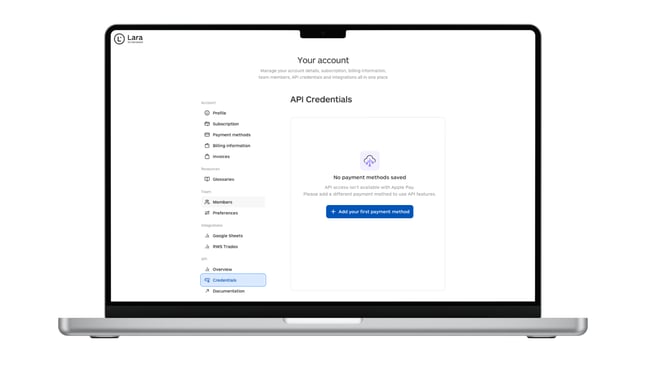
If no payment method is added and billing information is not completed, API usage is limited to 10,000 characters per month.
System requirements
-
Android 9 or later
-
Internet connection required
Download Lara Translate on Android
Lara Translate is available on the Google Play Store.
This article is about:
-
Using Lara Translate on Android for text, document, and voice translations
-
Navigating the home screen and switching between translation modes
-
Translating text and interacting with translation results and feedback
-
Customizing translations with Styles and contextual information
-
Using Interpreter mode for real-time spoken translation
-
Translating documents and downloading or sharing results
-
System requirements and how to download the Android app
- Viewing alternative translations using the ALT button
- Right-to-left language support