
Sometimes you translate the same kind of content more than once, or you simply want to keep track of a translation you're happy with. That's why Lara includes My Translations, a personal library where you can save translations and come back to them whenever you need, without repeating the work from scratch.
Here's how it works:
- After translating a text, look at the toolbar below the translation output. Next to the speaker, copy, and share icons, you'll find a bookmark icon ("Save translation") — it's always there, and becomes clickable once there's a translation to save.
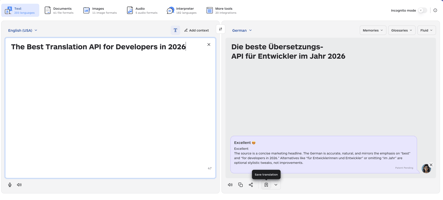
- Click it to save the source text, the translated text, and any edits you've made to the output.
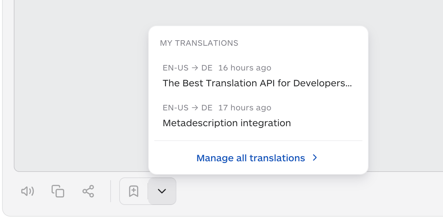
- Your most recently saved translations appear in a quick-access dropdown, showing the language pair and how long ago each one was saved. From there, click "Manage all translations" to open the full My Translations page.
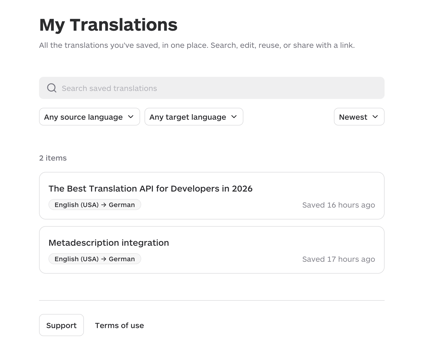
- On the My Translations page, you can search your saved translations, filter by source or target language, and sort them (for example, by "Newest"). Each item can be opened, shared via link, renamed, or deleted.
Note: deleting a saved translation cannot be undone. If it had been shared, the shared link will stop working once the translation is deleted.
This is especially useful if you:
- often translate similar content and want quick access to past versions
- want to build a personal reference of translations you're satisfied with
- need to share a specific translation with someone via a link
Note: My Translations is currently available only for text translations. Saving documents, images, or audio translations is not yet supported.
Note: Saved translations are personal — they are only visible to you, and are not shared with or visible to other members of your team.
This article is about:
- What My Translations is and how to save a translation
- Finding, searching, and filtering your saved translations
- Sharing, renaming, and deleting saved translations
- Current limitations (text only, personal to your account)