
Lara allows you to translate text embedded in images inside PDF documents, so you can obtain a fully localized document that is aligned with your business needs.
Image translation is optional and must be explicitly enabled during document upload.
When image translation is available
The option to translate images is available only when uploading PDF documents.
-
The image translation toggle appears only for PDFs
-
The option is disabled by default
-
Image translation is not applied automatically to all document translations
How to enable image translation in a PDF
When uploading a PDF document:
-
Upload your PDF file in the document translation section
-
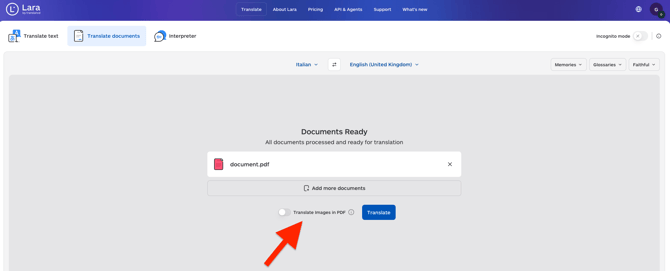
If the document contains images, a Translate images toggle will appear
-
Enable the toggle to translate text embedded in images
-
Select your target language(s)
-
Start the translation
If the toggle is not enabled, only text content outside images will be translated.
What happens when image translation is enabled
When image translation is enabled:
-
Text embedded in images inside the PDF is detected using OCR
-
The detected text is translated into the selected target language
-
The translated text is rendered back into the document
-
The final output preserves the original document structure
Multi-language and multi-upload behavior
Image translation applies consistently across different workflows:
-
Multiple target languages
If you translate the same PDF into multiple languages, image translation is applied to all target languages. -
Multiple document uploads
If you upload multiple PDF documents at once, image translation is applied to all uploaded PDFs when the option is enabled.
How image translation affects usage
When image translation is enabled for a PDF document, translated images contribute to usage based on the number of characters extracted and translated from each image.
Only images that are translated are included in the character count. The total usage for a PDF includes both the text content of the document and the text extracted from translated images.
This article is about:
-
translating text contained in images inside PDF documents
-
enabling or disabling image translation during document upload
-
understanding how image translation works in single, multi-upload, and multi-language scenarios