
You can now use Lara directly inside memoQ through our official integration.
This allows you to combine memoQ’s translation environment with Lara’s adaptive machine translation - all in one place.
Context Adaptation
The Lara plugin for memoQ lets you work segment by segment while Lara processes the full source context before generating a translation. This ensures each translated segment is informed by the document’s meaning and style, improving consistency and fluency.
Install the Lara plugin
- Download the Lara Translate for memoQ plugin from this page.
- Run the installer and open memoQ.
Set up Lara in the memoQ environment
memoQ does not automatically create a Lara profile.
The first time you use the plugin, you must create your own MT profile.
- Go to Options → Default Resources → MT Plugins.
- Click Create new.
- Enter a name such as Lara Translate or Lara MT.
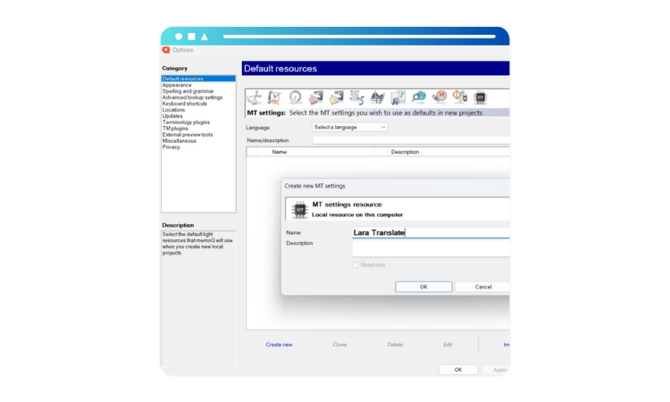
- Select your new profile and click Edit.
- From the plugin list, choose Lara Translate.
- Click Configure plugin and log in with your Lara credentials.

Once connected, your profile will use Lara as its machine translation engine.
Enable Lara as your default MT provider
- Go to Options → Default Resources → MT Settings.
- Select your Lara Translate MT profile.
- Click OK.
memoQ will now use Lara by default when creating new projects.
Enable Self-Learning MT in memoQ
To allow Lara to receive your segment edits in real time:
- Go to Options → Default Resources → MT Plugins.
- Select your Lara Translate profile and click Edit.
- Open the Settings tab.
- Under Self-Learning Machine Translation, choose Lara Translate from the dropdown.
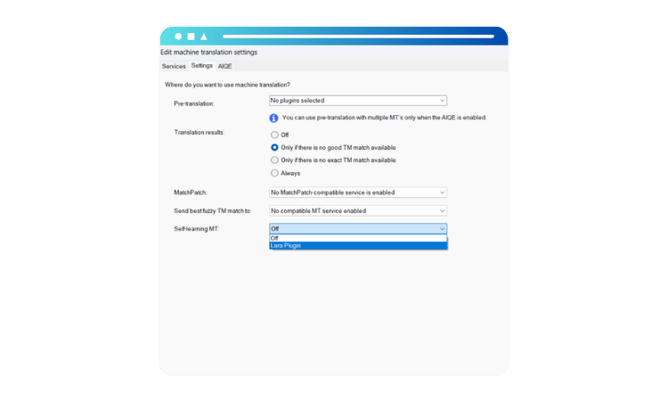
- Save and close.
This links memoQ’s confirmations to your Lara Translation Memories.
Translate with Lara in memoQ
- Create a new memoQ project.
- Go to Project Home → Settings → MT Settings.
- Make sure Lara Translate is selected.
- Open a document and begin translating.
Lara will appear in the Translation Results pane with adaptive MT suggestions.
Connect and manage Translation Memories (TMs)
You can personalize Lara’s translations by connecting Translation Memories during plugin setup. Each TM can be:
- Use → used as leverage in the translations
- Use & Update → used and updated in real time
Real-time TM updates
When Update is enabled every confirmed segment in memoQ is immediately sent to Lara and updates the connected TM instantly.
You can verify this in your Lara dashboard:
- Go to Text Translation in your Lara account.
- Select the TM used in memoQ.
- Choose the same language pair.
Translate the same segment - you’ll see your updates applied instantly.
Usage
Lara’s memoQ plugin includes a usage-caching feature: any translation retrieved within the last 24 hours will not be charged again, even if you reopen the project or re-translate the same text.
This lets you freely review, edit, or re-run translations without incurring additional quota usage.
You can monitor your character consumption directly via the dedicated MemoQ counter in the web app dashboard.
You’re all set
You can now translate directly in memoQ with Lara’s adaptive MT and take advantage of real-time TM learning — without leaving your CAT tool.
This article is about:
- How to install and activate the Lara plugin in memoQ
- How to create and configure Lara MT profiles
- How to connect Lara Translation Memories
- How real-time TM updates work between memoQ and Lara
- How usage and caching work inside memoQ